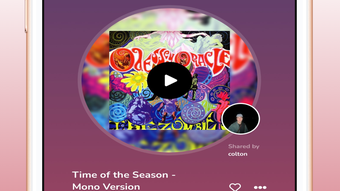

Record Social: Share Music Globally
Overview
Record Social is a desktop application designed for music enthusiasts seeking to connect with others through shared musical experiences. The software functions as a social platform focused on music sharing, discovery, and community engagement. Users can create profiles that reflect their musical tastes, with the platform tracking top songs to build a personalized musical archetype. This feature enables users to express their identity through music and discover others with similar preferences. The application supports seamless playlist synchronization, allowing users to share curated collections with friends across the platform.
Designed for both casual listeners and dedicated music lovers, Record Social fosters real-time interaction through a visually engaging interface. The platform integrates a GPS-based feature that highlights local music trends, helping users explore emerging artists and popular tracks within their geographic area. This functionality encourages deeper involvement with regional music scenes and promotes cultural exchange through sound. The homepage acts as a central hub for music discovery, displaying content shared by friends and algorithmically selected tracks based on user preferences.
While the developer, Record Social, has not provided additional details about the company’s background or development philosophy, the application’s core purpose is clear: to create a global community centered around music. It supports users in sharing favorite tunes, tracking their reach through a unique timeline feature, and forming authentic connections through shared auditory experiences. The software is available on both Windows and Mac, making it accessible to a broad audience of desktop users.
Key Features & Capabilities
- Music Profile & Taste Analysis – The software automatically tracks users’ most-played songs to generate a personalized musical archetype, helping define individual taste and improve content recommendations.
- Playlist Syncing – Users can synchronize their existing playlists across devices and share them instantly with friends, enabling effortless music collaboration.
- GPS-Based Music Discovery – A location-aware feature identifies trending songs in the user’s immediate area, promoting exploration of local artists and regional music movements.
- Timeline Tracking – Every shared song is logged on a timeline, allowing users to monitor how far their music has traveled and how it’s being received by others.
- Personalized Homepage Hub – The main interface curates content based on friends’ shares and algorithmic suggestions, offering a dynamic experience tailored to individual preferences.
- Community Engagement – Users can connect with like-minded individuals through shared interests, fostering meaningful interactions centered around music.
These features collectively support a seamless music-sharing experience. For example, a user in New York can discover a rising indie band from Brooklyn through the GPS feature, share the track with friends, and track its popularity growth through the timeline. The playlist sync function ensures that curated collections remain consistent across devices, while the profile system helps users identify new music aligned with their evolving tastes.
User Interface, Workflow & Performance
The user interface of Record Social is described as sleek and tailored to music preferences, emphasizing visual clarity and intuitive navigation. Users can access core functions—such as profile management, playlist sharing, and discovery tools—through a streamlined layout. The homepage serves as the central access point, organizing content by relevance, friend activity, and algorithmic recommendations.
Workflow efficiency appears to be a priority, with minimal steps required to share music, sync playlists, or view trending tracks. The timeline feature likely integrates into the main dashboard, providing real-time updates on content reach. However, exact performance details were not specified. The developer did not provide information on CPU or RAM usage, nor did they disclose stability benchmarks or load times under heavy usage.
General software behavior patterns suggest the application operates smoothly on modern desktop systems, particularly given its 500 MB installation size. Without specific resource data, performance observations are based on typical desktop application standards. Users can expect consistent responsiveness during regular use, though heavy multitasking may impact performance depending on system configuration.
Compatibility & System Requirements
Record Social is compatible with both Windows and Mac operating systems. The software version is 1.0.0, with an installation size of 500 MB. This indicates a lightweight desktop application suitable for most modern systems.
Exact system requirements were not listed. The developer did not specify minimum CPU, RAM, or storage needs. Compatibility information is limited to the supported platforms and version number. Users should ensure their system meets standard requirements for running desktop applications, particularly those involving media playback and network connectivity.
Pros and Cons
Pros
- Intuitive interface tailored for music lovers and social engagement
- Seamless playlist synchronization across devices
- GPS-based discovery enhances local music exploration
- Timeline feature offers unique insight into music reach and popularity
- Free to download and use with no cost barrier
- Supports both Windows and Mac platforms
Cons
- No detailed system requirements provided
- Resource usage and performance metrics not disclosed
- Exact update frequency and release schedule unknown
- Limited information on data privacy and security practices
- Platform-specific optimization details not available
FAQ Section
Is Record Social available for Windows and Mac?
Yes, Record Social is compatible with both Windows and Mac operating systems.
Is the software free to use?
Yes, Record Social is available at no cost. There are no subscription fees or in-app purchase requirements.
Does Record Social require an internet connection?
Yes, the application relies on an active internet connection for features such as playlist syncing, GPS-based discovery, and social interactions.
Can I use Record Social offline?
While the software may allow limited access to cached content, full functionality requires online connectivity due to its social and discovery-based nature.
How often are updates released?
The developer has not specified the update frequency. Users should check the official site or in-app notifications for the latest version.
Final Thoughts + CTA
Record Social presents a compelling vision for music lovers seeking to connect globally through shared auditory experiences. Its unique blend of social networking, music discovery, and location-based trends sets it apart from generic music platforms. The timeline feature and playlist sync capabilities offer practical tools for tracking and sharing music, while the sleek interface enhances usability.
Although technical details such as system requirements and performance data are limited, the application’s core functionality is clearly defined and well-executed for its intended audience. The free model removes barriers to entry, making it accessible to a wide range of users. For musicians, fans, and community-minded listeners, Record Social offers a dynamic way to explore music and build connections.
With its cross-platform availability and focus on authentic engagement, Record Social stands out as a promising desktop application for music enthusiasts. The integration of GPS-driven discovery adds a layer of real-world relevance that few platforms offer.
Download Record Social now







